
One link, and the client approves the month's posts
Agencies lose days waiting for post sign-off. Send one link, the client opens it on their phone, taps Approve or Send back on each post, and the approved ones go out on their dates.
What it does
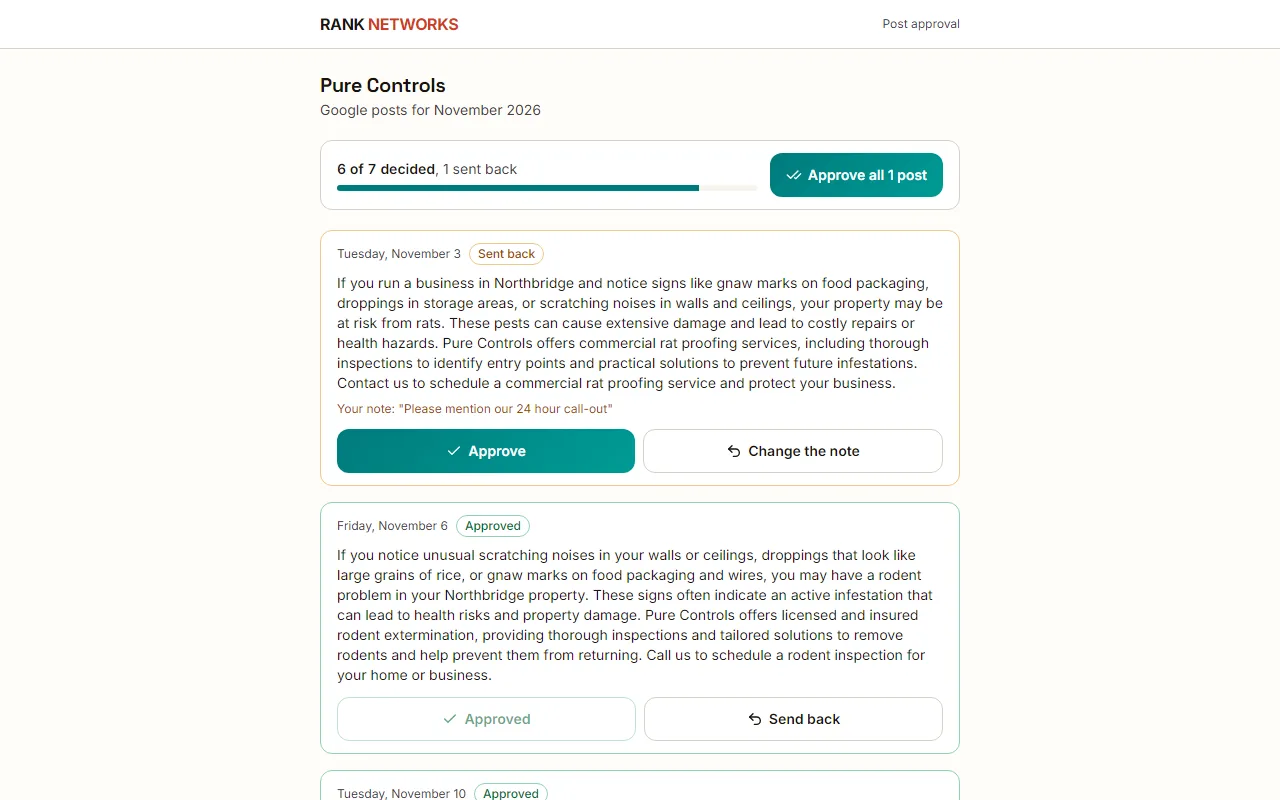
The client approval link turns a month of planned posts into one page the client can open without an account. They see each post with its date, text, image and button, approve the ones they like and send back the ones they do not with a one-line reason. You get one email when they are done.
A real-life example
Say you run a marketing agency in Manchester with a client who runs a bakery.
Before: Every month you email eight post drafts as a document, chase for a week, and get back a reply with half of them changed in the wrong place.
After: You click Send to client for approval on the post calendar. The owner opens the link on her phone, approves six and sends back two with a reason. The six go out on their dates, the two sit on your Tasks page with her note.
How you would use it
- 1.Open the business's Post calendar and click Send to client for approval.
- 2.Pick this month or next, add the client's email and a note if you like, and send. The email goes from Rank Networks with you as the reply address.
- 3.The client opens the link, reads each post and taps Approve or Send back with a reason. Approve all is there too.
- 4.You get one email, and a Slack message if you use Slack, when the last post is decided.
- 5.Fix the posts that came back from the Tasks page, where the client's reason is shown.
The mechanism, in plain words
What runs behind the page, what it reads, and where Google's rules shape it.
- Each link covers one month of posts and works for 45 days. A new link for the same month turns the old one off, and Turn link off ends one early.
- Approved posts keep their date. If the posting schedule waits for approval, approving moves them to scheduled.
- A post that is sent back is held as a draft with the reason, shows on the calendar and becomes a task. Editing it clears the return.
- With white label on, the approval page shows your agency's name, not ours.
Included in every package
Client approval link comes with every package. Each package covers a number of Google Business Profiles and one shared monthly pool of Grid Credits, links, audits and AI images.
Nothing from the monthly pool.
A new account starts with 250 free Grid Credits that never expire. Every package has a 14-day money-back promise. See the full pricing page.
Questions, answered
Works well with
Try Client approval link on your own profile
Create a free account, connect a Google Business Profile, and pick a package when you are ready. Every package includes every feature.