
Google posts, written and published on schedule
A profile that posts every week looks alive to Google and to customers. The post calendar writes posts from your own website, reviews and services, puts them on the days you choose, and publishes them for you or after your yes.
What it does
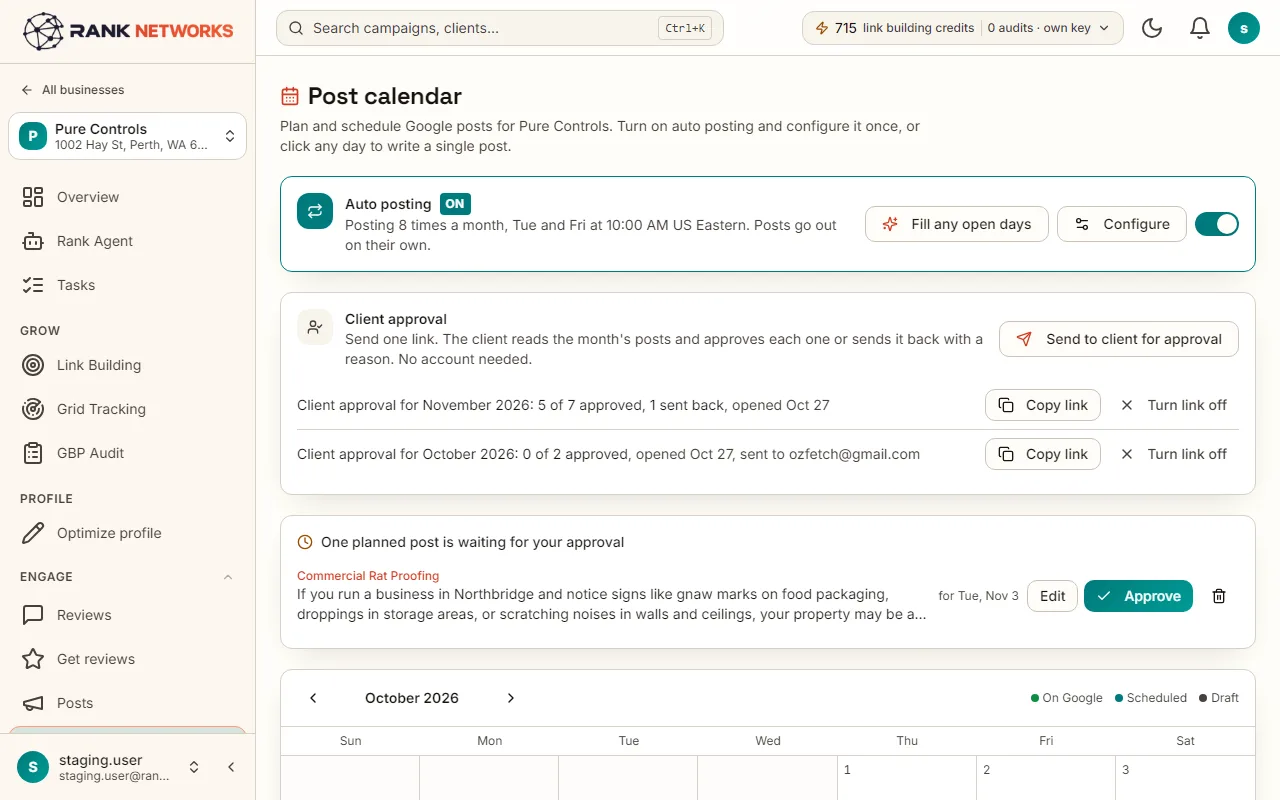
The post calendar keeps a Google Business Profile posting without you writing each post. You pick topics, how often, which days and what time; the writer drafts posts from the business's own website, reviews and services, with an AI illustration or one of your photos, and keeps the calendar filled four weeks ahead. Posts go out on their own or wait for your approval, and every post is checked against Google's rules before it is published.
A real-life example
Say you run a landscaping company in Portland.
Before: The last post on the profile was from the spring before last.
After: You choose three topics, Tuesday and Friday at ten, and your own photos. Eight posts are drafted for the next four weeks; you approve them in five minutes, and the calendar refills itself each week.
How you would use it
- 1.Open a business and click Post calendar.
- 2.In the Auto posting bar, choose topics with a share and a link, the days and the time, and whether images are AI drawn, your own photos or none.
- 3.Choose Review first or Post automatically.
- 4.Read the drafts on the calendar, edit or skip any, or press Approve all.
- 5.Send the month to a client with the approval link if you need their sign-off.
The mechanism, in plain words
What runs behind the page, what it reads, and where Google's rules shape it.
- The writer uses the business's website, reviews and services as sources, so posts talk about real work and real services.
- Drafts are prepared a few weeks ahead and topped up every few hours; publishing runs every five minutes, in the business's time zone.
- Every post is checked against Google's post rules: a phone number in the text is blocked, and shouting or a run of exclamation marks gets a warning, because Google rejects such posts.
- AI illustrations are marked as illustrations and never used as profile photos. Your own photos are used as they are.
- A post that fails on Google's side shows the reason on the calendar.
Included in every package
Post calendar comes with every package. Each package covers a number of Google Business Profiles and one shared monthly pool of Grid Credits, links, audits and AI images.
Writing uses nothing from the monthly pool. Each AI illustration takes one AI image from the pool: 10 a month on Solo, 50 on Growth, 150 on Agency and 300 on Scale. Posts with your own photos or no image take nothing.
A new account starts with 250 free Grid Credits that never expire. Every package has a 14-day money-back promise. See the full pricing page.
Questions, answered
Try Post calendar on your own profile
Create a free account, connect a Google Business Profile, and pick a package when you are ready. Every package includes every feature.