
Your whole Google Business Profile, on one page
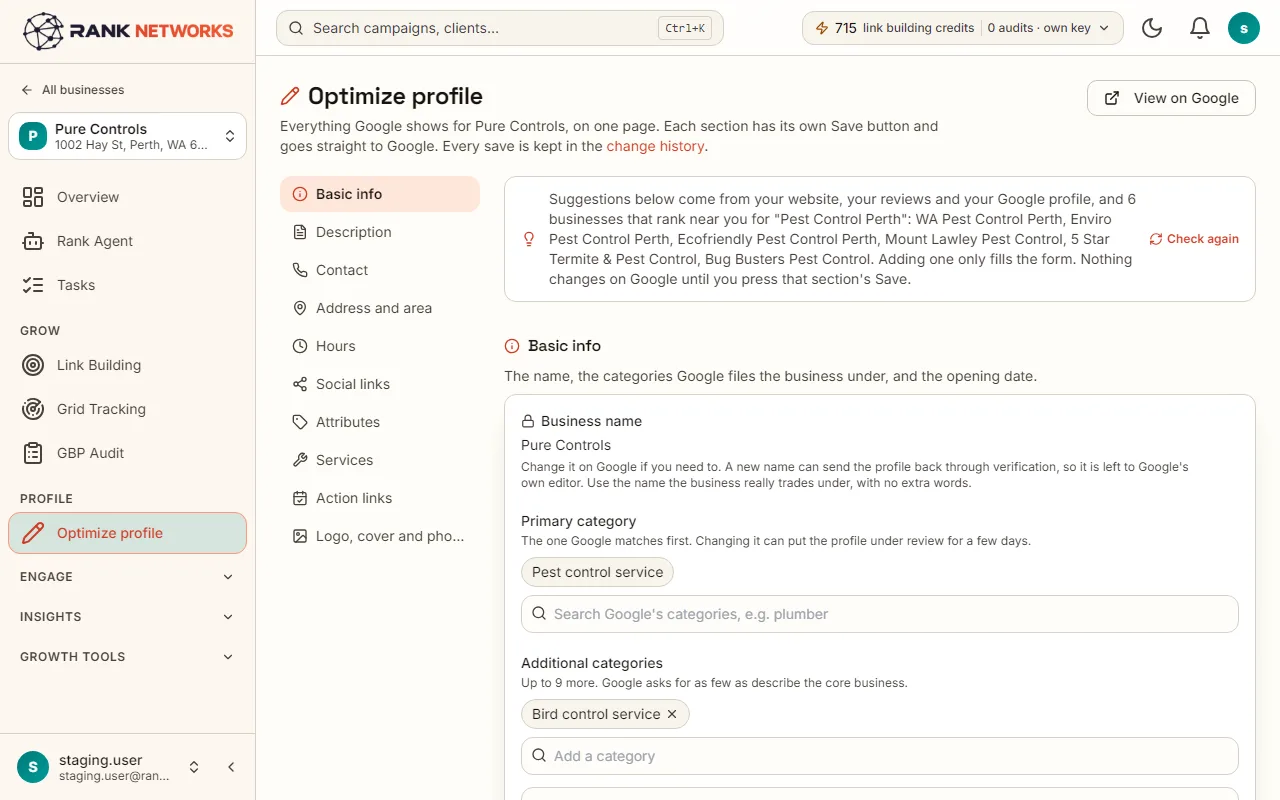
Every part of the profile sits on one long page with a section index: details, categories, description, services, attributes, hours, links and photos. AI suggestions are written from the business's own website and reviews, and each one is added with a click or skipped.
What it does
Optimize profile shows everything Google knows about the business and lets you change it in one place. It writes a business description and a description for each service from the business's own website and reviews, and shows which categories the businesses ranking nearby use that you do not. Each save goes straight to Google.
A real-life example
Say you run a dental practice in Austin and set up your profile years ago.
Before: The description is two lines, half the services have no text, and you have no idea which categories your competitors use.
After: You open Optimize profile. The description and every service description are drafted from your own website and reviews, you read and add them, and the category comparison shows two categories the practices ranking around you use that you had not added.
How you would use it
- 1.Open a business, click Optimize profile, and use the index on the left to jump to a section.
- 2.Click Write with AI on the description or on Services. Read the draft, change what you like, and save.
- 3.Under Subcategories, see which subcategories the businesses ranking nearby use that you do not, tick the ones that fit and press Add ticked.
- 4.Fill the rest: attributes, hours and special hours, opening date, booking and ordering links, social links and photos.
- 5.Each section saves on its own, straight to Google.
The mechanism, in plain words
What runs behind the page, what it reads, and where Google's rules shape it.
- The AI writer reads only the business's own website, Google profile and reviews. A service that none of those sources mention is flagged rather than invented.
- Category comparison reads the Google listings of up to six businesses that rank nearby for your main category, from your latest map scan first and a nearby search after that.
- The page checks the business name against Google's rules and shows how much of the photo set is covered.
- Every save is written to Google through the official Business Profile API and recorded in change history.
Included in every package
Optimize profile comes with every package. Each package covers a number of Google Business Profiles and one shared monthly pool of Grid Credits, links, audits and AI images.
Nothing from the monthly pool. AI writing is included in every package.
A new account starts with 250 free Grid Credits that never expire. Every package has a 14-day money-back promise. See the full pricing page.
Questions, answered
Try Optimize profile on your own profile
Create a free account, connect a Google Business Profile, and pick a package when you are ready. Every package includes every feature.