
Changes you did not make, put back within minutes
Google and other people can edit a profile without asking. Profile Guarding checks it every 15 minutes, puts changed fields back or tells you, and keeps a record of every change.
What it does
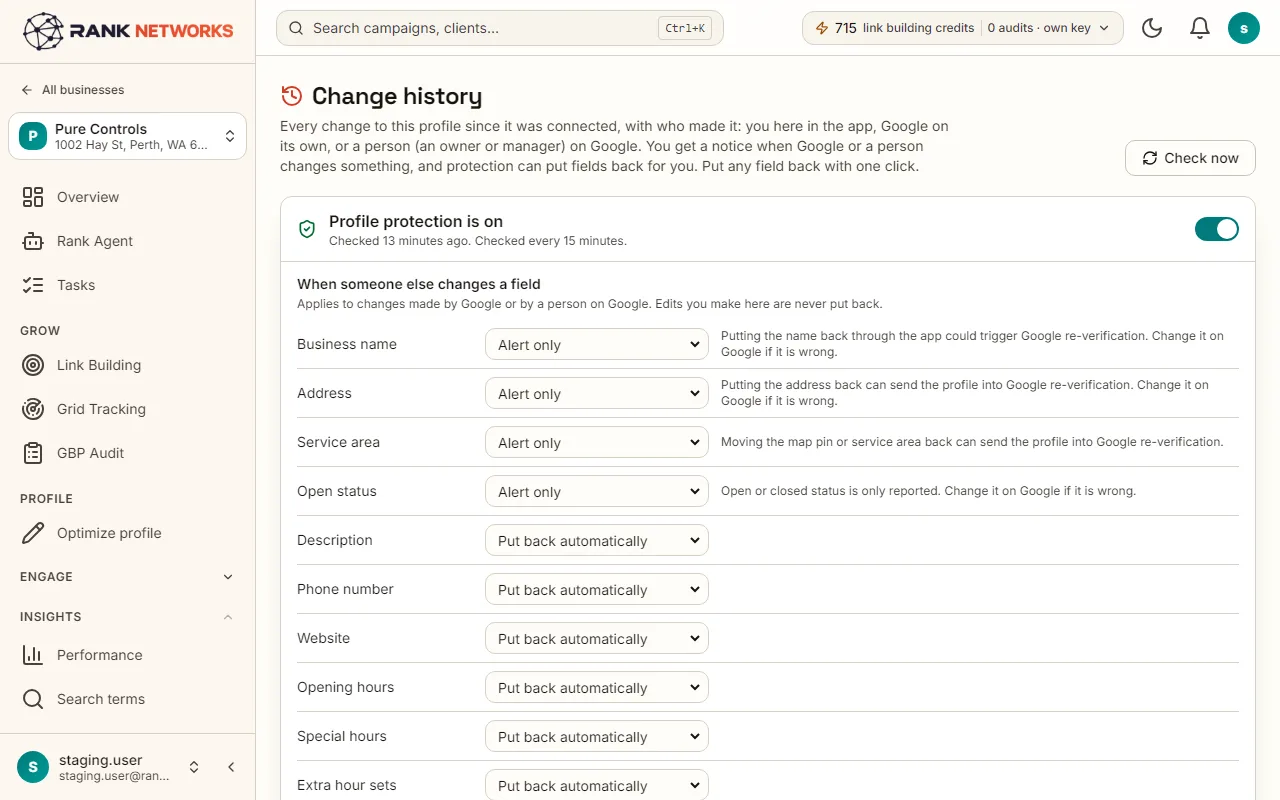
Profile Guarding keeps a copy of the profile as you want it. When something changes on Google, from Google itself, a manager or a stranger's suggested edit, it compares field by field and either puts the field back or sends you an alert. Every change, who made it and what was done about it is kept in change history.
A real-life example
Say you run a heating and cooling company in Phoenix.
Before: Google added a category on its own, someone changed your opening hours, and you found out weeks later when a customer turned up to a closed door.
After: With Profile Guarding on, the hours are put back within 15 minutes and you get one email saying what happened. The category change waits for your Keep mine or Accept.
How you would use it
- 1.Open a business, click Change history, and turn on Profile Guarding.
- 2.For each field, choose Put it back, Alert me or Ignore. Name, address, service area and status are alert only.
- 3.Add up to three email addresses for alerts.
- 4.Read the change log when an alert arrives, and use Put it back on any older change you want undone.
- 5.Download the proof log as a CSV for a client when they ask what happened.
The mechanism, in plain words
What runs behind the page, what it reads, and where Google's rules shape it.
- A snapshot of the profile is taken when you turn the guard on. Every 15 minutes the live profile is read through Google's API and compared with it.
- Fields set to Put it back are restored at once and logged. Fields set to Alert me only send an email. Name, address, service area and open or closed status are never changed without you, because a wrong restore there can get a profile suspended.
- Google's own pending updates are shown separately with Keep mine or Accept.
- The owner and manager list is checked too, so you know when someone new can manage the profile.
- Without the guard, the profile is still checked four times a day and changes are only reported.
Included in every package
Profile Guarding comes with every package. Each package covers a number of Google Business Profiles and one shared monthly pool of Grid Credits, links, audits and AI images.
Nothing from the monthly pool.
A new account starts with 250 free Grid Credits that never expire. Every package has a 14-day money-back promise. See the full pricing page.
Questions, answered
Try Profile Guarding on your own profile
Create a free account, connect a Google Business Profile, and pick a package when you are ready. Every package includes every feature.