
Every automation for your profile, on one page
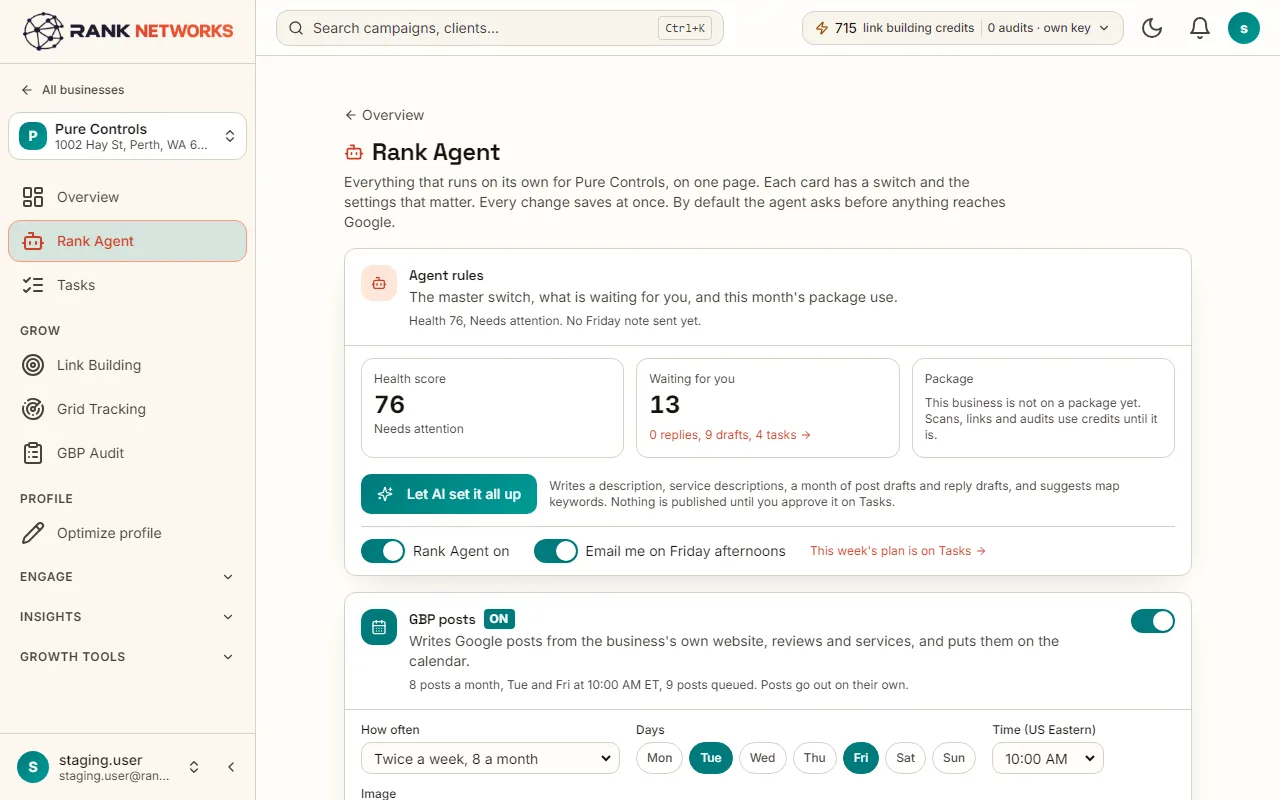
Rank Agent is the control room for one business. Each card is one job, with a switch, a status line and its main settings, so you can see at a glance what runs on its own and what waits for you.
What it does
Rank Agent gathers everything Rank Networks can do for one Google Business Profile onto a single page. Posts, review replies, Profile Guarding, link building, competitor watch, map scans, audits and reports each get a card with a switch. One button, Let AI set it all up, prepares the writing for a new business and sends it to your task list to approve.
A real-life example
Say you run a small agency in Denver and have just connected a new client, a plumbing company.
Before: Setting up a new client meant visiting eight different pages: write a description, describe each service, draft the first posts, set up replies, turn on the guard, schedule a scan.
After: You open Rank Agent, press Let AI set it all up, and the description, service descriptions, post drafts, reply drafts and keyword ideas are prepared from the client's own website and reviews. You read them on the Tasks page, approve what you like, and flip the switches for the jobs you want to run every week.
How you would use it
- 1.Open a business and click Rank Agent in its menu.
- 2.Read the top card: the health score, what is waiting for you and how much of the monthly pool is used.
- 3.Turn on the cards you want: posts, replies, Profile Guarding, scans, audits, reports. Each one saves at once.
- 4.For a new business, click Let AI set it all up, then go to Tasks to approve what was prepared.
- 5.Come back any time. The status line on each card tells you when it last ran.
The mechanism, in plain words
What runs behind the page, what it reads, and where Google's rules shape it.
- Each card saves through the same setting that its full page uses, so Rank Agent and the deeper pages always agree.
- Let AI set it all up reads the business's own website, Google profile and reviews, and writes only from those. It never publishes; everything lands on the Tasks page as a proposal.
- Approve all safe tasks sends the prepared descriptions, services, posts and replies to Google in one go, after you have read them.
- Nothing spends from the monthly pool or edits Google unless its switch is on.
Included in every package
Rank Agent comes with every package. Each package covers a number of Google Business Profiles and one shared monthly pool of Grid Credits, links, audits and AI images.
Rank Agent itself uses nothing from the monthly pool. The jobs you switch on use what they always use: scans take Grid Credits, link building takes links, audits take audits and AI post images take AI images.
A new account starts with 250 free Grid Credits that never expire. Every package has a 14-day money-back promise. See the full pricing page.
Questions, answered
Works well with
Try Rank Agent on your own profile
Create a free account, connect a Google Business Profile, and pick a package when you are ready. Every package includes every feature.