
Know about a bad review before your customers do
A one-star review left unanswered for a week costs more than the review itself. Review alerts email you the moment one lands, warn you about a run of bad reviews, and can send a daily summary.
What it does
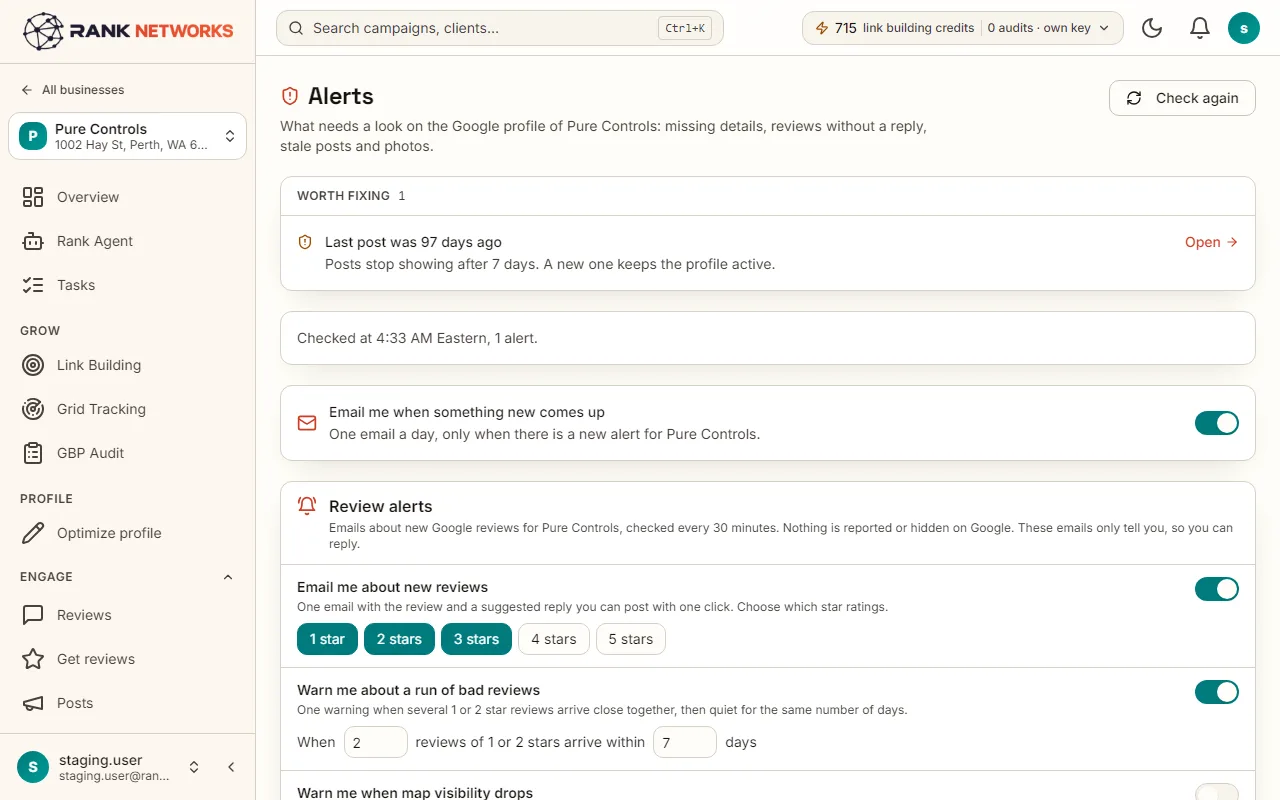
Review alerts watches each connected profile and emails you when something needs attention. You choose which star ratings trigger an alert, how many bad reviews in how many days count as a run, and whether you want a daily summary. With a scheduled map scan in place, it can also warn you when the business shows on less of the map than before.
A real-life example
Say you manage a chain of four gyms in Chicago.
Before: A member posted three angry reviews in a weekend about a broken shower, and nobody saw them until Tuesday.
After: The first review triggers an email within half an hour with a one-click reply, and the second one trips the bad-run warning so the manager rings the member that afternoon.
How you would use it
- 1.Open a business, click Alerts, and find Review alerts.
- 2.Tick the star ratings that should email you. One to three stars is the usual choice.
- 3.Set the bad-run rule: how many low reviews within how many days.
- 4.Add up to three email addresses, turn on the daily summary if you want it, and press Send a test.
- 5.Open an alert email and use the reply link to answer from there.
The mechanism, in plain words
What runs behind the page, what it reads, and where Google's rules shape it.
- New reviews are checked every 30 minutes across every connected profile.
- A new-review alert carries the stars, the reviewer's first name, the review text and a link to reply, with a drafted reply when AI replies are on.
- The bad-run rule counts one and two star reviews within your window and sends one warning, not one per review.
- The visibility-drop alert compares a scheduled scan with the previous run of the same scan. It is off until you turn it on, because it needs a tracked scan to work.
- Every alert can go to Slack as well.
Included in every package
Review alerts comes with every package. Each package covers a number of Google Business Profiles and one shared monthly pool of Grid Credits, links, audits and AI images.
Nothing from the monthly pool.
A new account starts with 250 free Grid Credits that never expire. Every package has a 14-day money-back promise. See the full pricing page.
Questions, answered
Try Review alerts on your own profile
Create a free account, connect a Google Business Profile, and pick a package when you are ready. Every package includes every feature.