
Ask every happy customer for a review
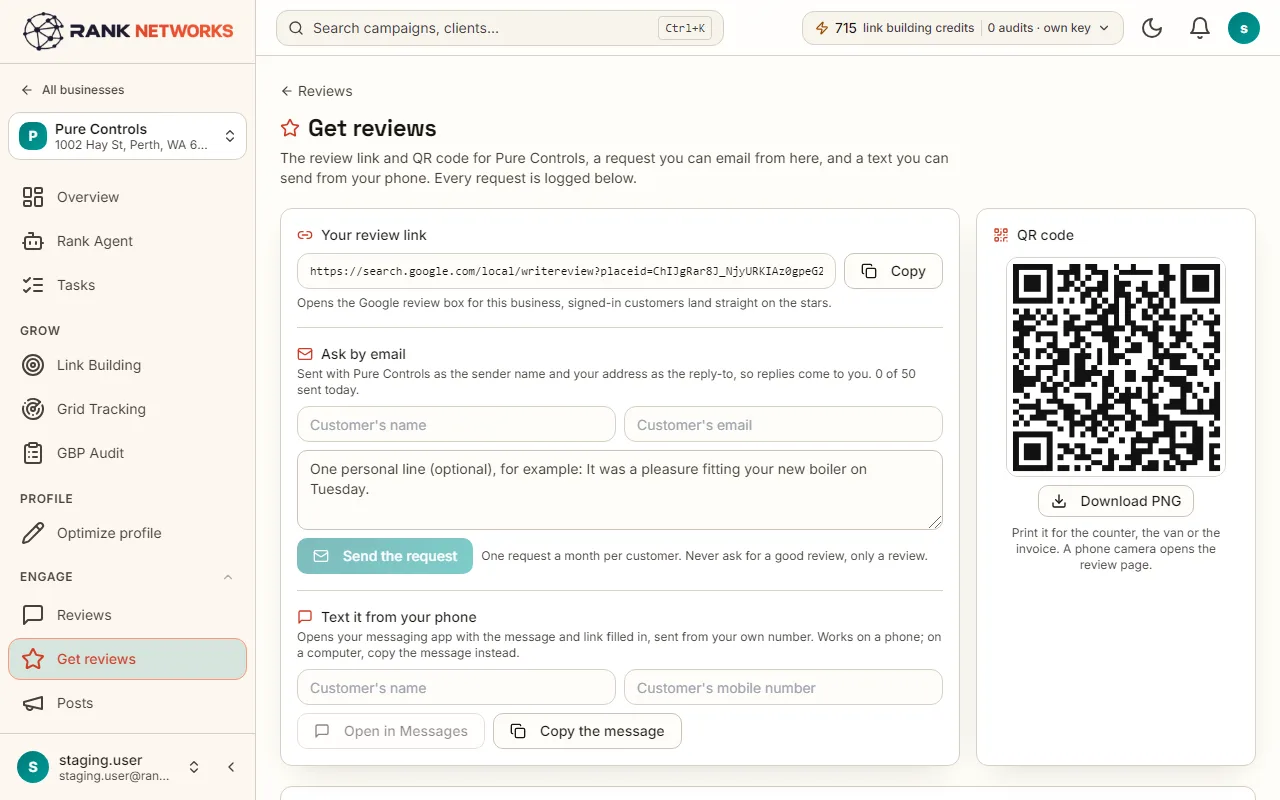
Most customers leave a review when asked and given a direct link. Get reviews gives you the link, a QR code for the counter, email requests sent from us, and a text you send from your own phone.
What it does
Get reviews collects every way of asking for a Google review in one place. You get the direct link to your review box, a QR code to print, an email request that goes out from Rank Networks with you as the reply address, and a ready-made text message that opens in your own messaging app. A log shows who was asked and when a request earned a review.
A real-life example
Say you run a plumbing company in Leeds.
Before: You meant to ask customers for reviews and never did, so the profile has eleven reviews from three years ago.
After: Your office adds each finished job to the list and an email goes out that afternoon with one link to the review box. The QR code sits on the invoice. The log shows which requests turned into reviews.
How you would use it
- 1.Open a business and click Get reviews.
- 2.Copy the review link or download the QR code and put it on invoices, receipts or a card at the counter.
- 3.Add a customer's name and email and send a request, or upload a CSV of recent customers.
- 4.On a job, use the text link to open a message in your own phone's messaging app.
- 5.Check the log to see who was asked and which requests earned a review.
The mechanism, in plain words
What runs behind the page, what it reads, and where Google's rules shape it.
- The review link points straight at the Google review box for the profile, so nobody has to search for you.
- Email requests go from support at Rank Networks with your address as the reply-to. Fifty a day, and each customer is asked at most once a month, so nobody is nagged.
- Every customer gets the same link, whatever they think of you. Sending unhappy customers somewhere else is review gating, which Google's rules forbid, so the page never does it.
- There is no text message gateway on purpose: the text opens in your own app, from your own number.
- A Zapier hook can add a customer from your booking or invoicing tool.
Included in every package
Get reviews comes with every package. Each package covers a number of Google Business Profiles and one shared monthly pool of Grid Credits, links, audits and AI images.
Nothing from the monthly pool.
A new account starts with 250 free Grid Credits that never expire. Every package has a 14-day money-back promise. See the full pricing page.
Questions, answered
Try Get reviews on your own profile
Create a free account, connect a Google Business Profile, and pick a package when you are ready. Every package includes every feature.