
Fresh photos on the profile every week, from one upload
A profile that gets a new photo every few days looks active. Photo scheduling takes a batch of real photos and adds them to the profile one at a time on the dates you choose.
What it does
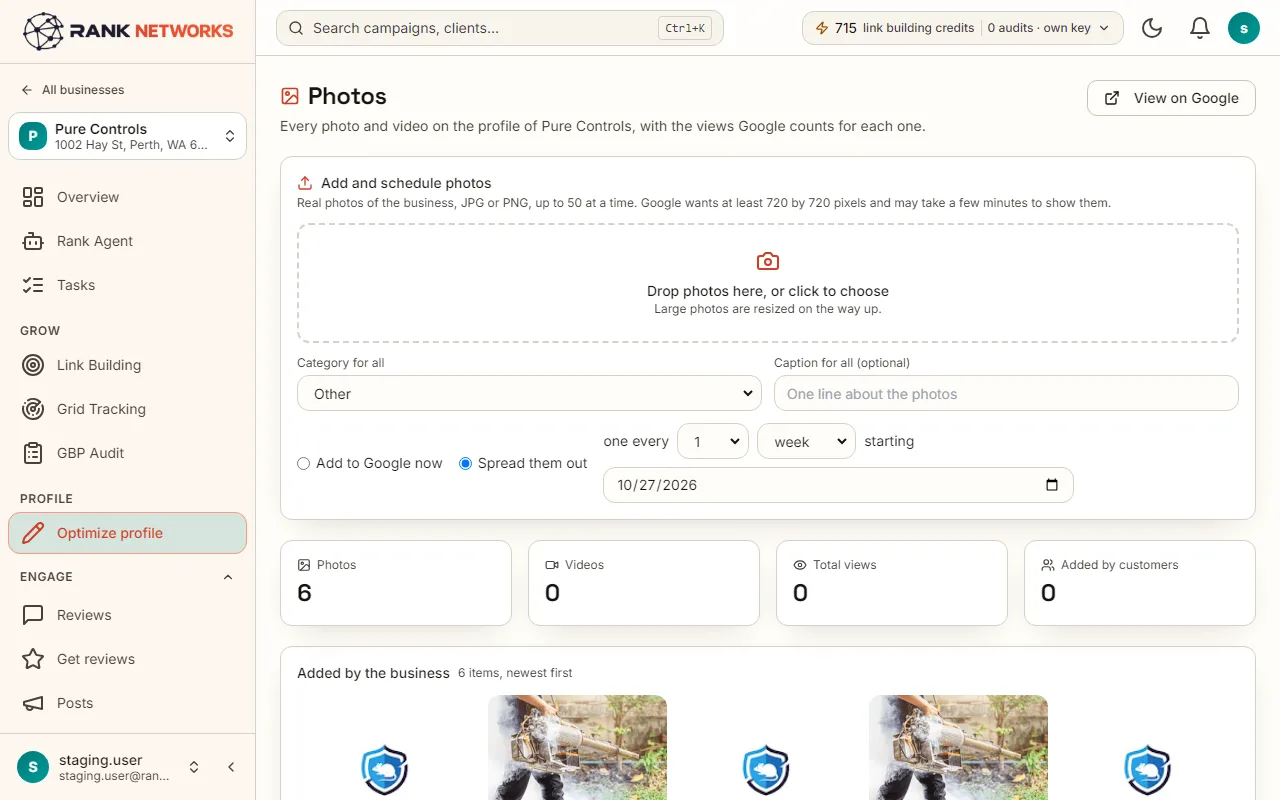
Photo scheduling lets you drop up to 50 photos at once, give them a category and a caption, and choose a rhythm such as one every three days from next Monday. Each photo is added to the Google Business Profile on its day, shows on the post calendar, and can be sent now or removed before then.
A real-life example
Say you run a kitchen fitting company in Glasgow and took forty photos of last month's jobs.
Before: You uploaded them all on one Sunday night and nothing for the next six months.
After: You drop the forty photos, mark them as work photos, and choose one every four days. The profile gets a new photo through to spring.
How you would use it
- 1.Open a business, click Optimize profile and go to Photos.
- 2.Drop up to 50 photos, and choose a category and a caption for the batch.
- 3.Choose Add now, or one every few days, weeks or months from a date.
- 4.Check the review list, which shows the date, category and caption per photo, and press Confirm.
- 5.See them on the post calendar, and use Send now or Remove on any of them.
The mechanism, in plain words
What runs behind the page, what it reads, and where Google's rules shape it.
- Photos are added through Google's Business Profile API on their scheduled day by a job that runs every five minutes.
- Only real photos. There is no AI image option on the Photos page, because profile photos must be genuine pictures of the business, which is what Google's rules ask for.
- A scheduled date in the past is refused, so nothing is published by surprise.
- Scheduled photos appear on the same calendar as posts, so you can see the whole month at once.
Included in every package
Photo scheduling comes with every package. Each package covers a number of Google Business Profiles and one shared monthly pool of Grid Credits, links, audits and AI images.
Nothing from the monthly pool.
A new account starts with 250 free Grid Credits that never expire. Every package has a 14-day money-back promise. See the full pricing page.
Questions, answered
Try Photo scheduling on your own profile
Create a free account, connect a Google Business Profile, and pick a package when you are ready. Every package includes every feature.