

"My business is not showing on Google Maps" can mean two completely different problems. Sometimes the profile is hidden: Google is not showing it to anyone, even when they type its exact name. Much more often, the business is on the map, but only for people standing close to it, or only when they search its name. The fixes for the two are completely different, so this guide starts with a five-minute test that tells you which one you have.
Then it goes through the 12 causes we see, one by one. For each one we link to the Google help page that states the rule, so you are not relying on our word, and where we can we show a real scan of a business with that exact problem. The scans come from our Google Maps rank tracker; names, photos and addresses are blurred.
The 5-minute test: is your business hidden, or just ranked low?
Do these in order. Each step takes about a minute, and you will know which half of this guide you need.
- 1
Search your exact business name on Google Maps
Open a private or incognito window so Google does not use your history, and type the name exactly as it appears on your sign. Add the town if the name is common. If nothing comes up, your profile is hidden: go to causes 1 to 6. If it comes up, Google is showing it: go to causes 7 to 12. - 2
Sign in and look at your Business Profile
Sign in with the Google account that manages the profile and search for your business name, or open it from the Business Profile manager. Google shows a notice at the top if the profile needs verifying, is suspended or has an edit under review. Google's troubleshooter also reminds you to check you are signed in to the right account. - 3
Search your phone number on Google Maps
If two listings come up, you have a duplicate, and Google will only show one of them. If a listing comes up with a different name, someone may have edited or claimed your listing. - 4
Search your main service, not your name
Type what a customer would: "emergency plumber", "dentist", "pest control". Note whether you appear and where. Then ask someone a few miles away to do the same on their phone. - 5
Run a grid scan for that service
A grid scan searches your keyword from dozens of points around you and shows your rank at each one. It answers the question step 4 cannot: are you missing everywhere, or only beyond your own street? Our guide to local SEO rank tracking explains how to read one.
Hidden or ranked low? The two kinds of "not showing"
Everything below falls into one of two groups. Hidden means Google has decided not to show the profile at all. Ranked low means it is showing, but other businesses come first for the searches that matter.
Hidden
The test: your exact business name finds nothing on Google Maps.
- 1. Not verified
- 2. Suspended or restricted
- 3. A duplicate profile
- 4. Not eligible for a profile
- 5. An edit under review
- 6. Too new to rank yet
Showing, but ranked low
The test: your name finds you, but "plumber" or "dentist" does not.
- 7. Only near your own door
- 8. A service Google does not connect with you
- 9. The wrong primary category
- 10. Weaker than the businesses around you
- 11. A service area set up wrong
- 12. Details that disagree across the web
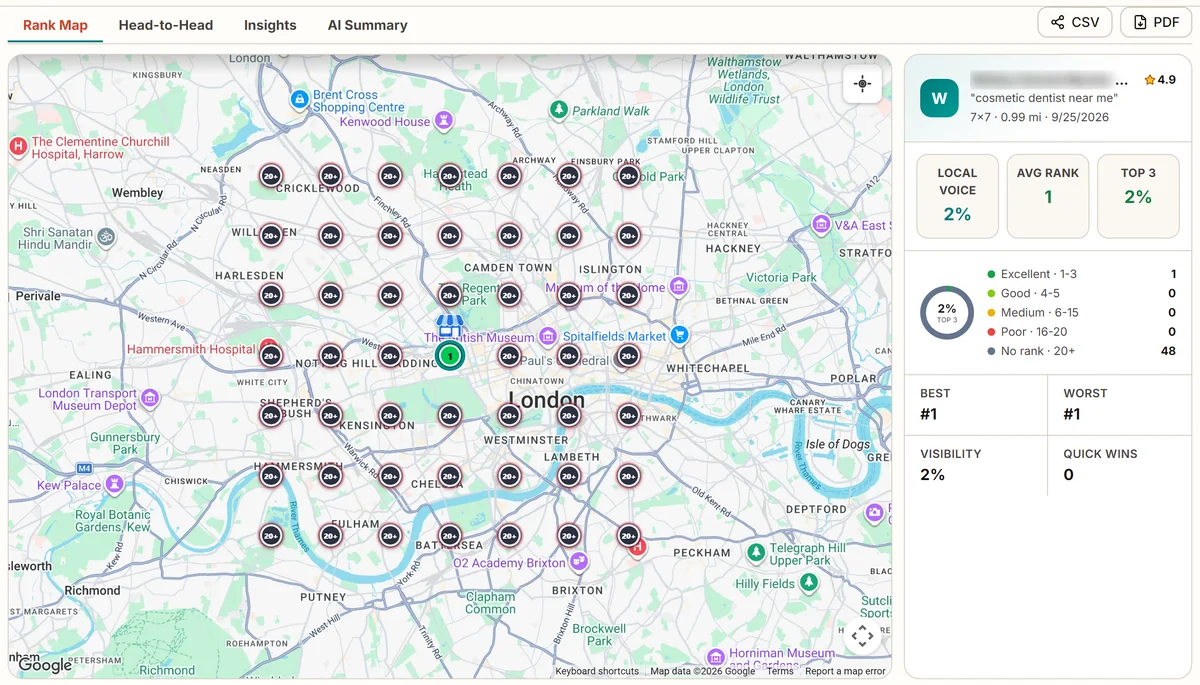
Ranked low is far more common. In 279 scans of 53 businesses we track, the business was missing from the top 20 at its own address in only 2% of scans. But in 42% of scans it was missing from the top 20 at one or more points on its map. Most owners who say "I am not on Google Maps" are in the second group: on the map near their door, and off it a few miles away.
Part 1: when your profile is hidden
1. The profile is not verified
Google is direct about this one: only verified businesses can show their business information on Maps and Search, according to its Business Profile troubleshooter. If you created a profile and never finished verification, or verification failed, customers will not see it.
Google decides which verification methods you are offered, and you cannot change them. The options are a phone call or text, an email, a live video call, a postcard by mail, or a recorded video. Google's review of a verification takes up to 5 business days, and a postcard code expires after 30 days.
How to fix it
Open your profile and look for a "Get verified" or "Verify" button. Follow the method Google offers. If you get the video option, Google's video verification page asks for at least 30 seconds, recorded live in one take, showing your street sign or a nearby landmark, your business signage (or for a business that goes to customers, your tools, equipment or branded van), and proof you manage the business, such as opening the till or using your card reader.
While a postcard is on its way, do not edit your business name, address or category. Google says the code will not work if you do.
2. The profile is suspended or your account is restricted
If your business was showing and then disappeared, a suspension is the first thing to rule out. Google says a removed profile cannot be viewed by the public. It also says that when the Google account managing your profiles is restricted, every profile on that account is suspended, and you cannot create or claim others.
The common triggers are in Google's guidelines: extra words in the business name, such as "Best Plumber Dallas" when the sign says "Dallas Pipe Co"; an address you do not really work from; a business that does not meet customers in person; and several profiles for one business.
How to fix it
Sign in and read the notice on the profile. Fix the cause first (for example, change the name back to the name on your signage), then appeal through Google's appeals tool with evidence: a business licence, a utility bill at the address, photos of your sign and premises.
Do not create a new profile while you wait. Google says this in so many words, and a second profile for the same business makes the problem worse.
3. There is a duplicate profile
Google allows one Business Profile per business, and says duplicate profiles will not show on Google Search or Maps. Duplicates usually come from a move (someone created a new profile instead of updating the address), a former employee or agency creating a second one, or Google creating a listing from public data before you claimed yours.
How to fix it
Search your phone number and your name on Google Maps to find every listing. If you created the extra one, remove it. If someone else controls it, request ownership; Google gives the current owner 3 days to respond. If two listings are the same place, you can suggest a merge from Google Maps. If you moved, update the address on your existing profile instead of making a new one, so you keep your reviews.
4. The business is not eligible for a profile
Not every business can have a profile. Google says a business must make in-person contact with customers during its stated hours, either at its own premises or at the customer's. A P.O. box is not allowed, and neither is a virtual office. Online-only businesses do not qualify.
A shared office or coworking space can qualify, but only when it has your own signage and staff there during your hours. A registered office address you never work from does not.
How to fix it
If you meet customers at their homes or sites but not at your address, you are a service-area business: keep the profile, hide the address and set service areas (see cause 11). If you only work online, a Business Profile is the wrong tool, and your effort is better spent on your website.
5. An edit is under review
When you change your name, address, category or other key details, Google reviews the change before showing it. Google says edits usually take up to 10 minutes to review, but sometimes up to 30 days. A big change such as a new address can also mean verifying the profile again.
How to fix it
Make big edits one at a time and only when you need to. If an edit was rejected, Google lets you appeal it from the same appeals tool. If a profile disappears straight after an edit, wait for the review before making more changes.
6. The profile is new
A new profile can be live and still hard to find. Google's troubleshooter says changes can take up to 3 days to appear and that rankings for new businesses can take up to a month to show in search results.
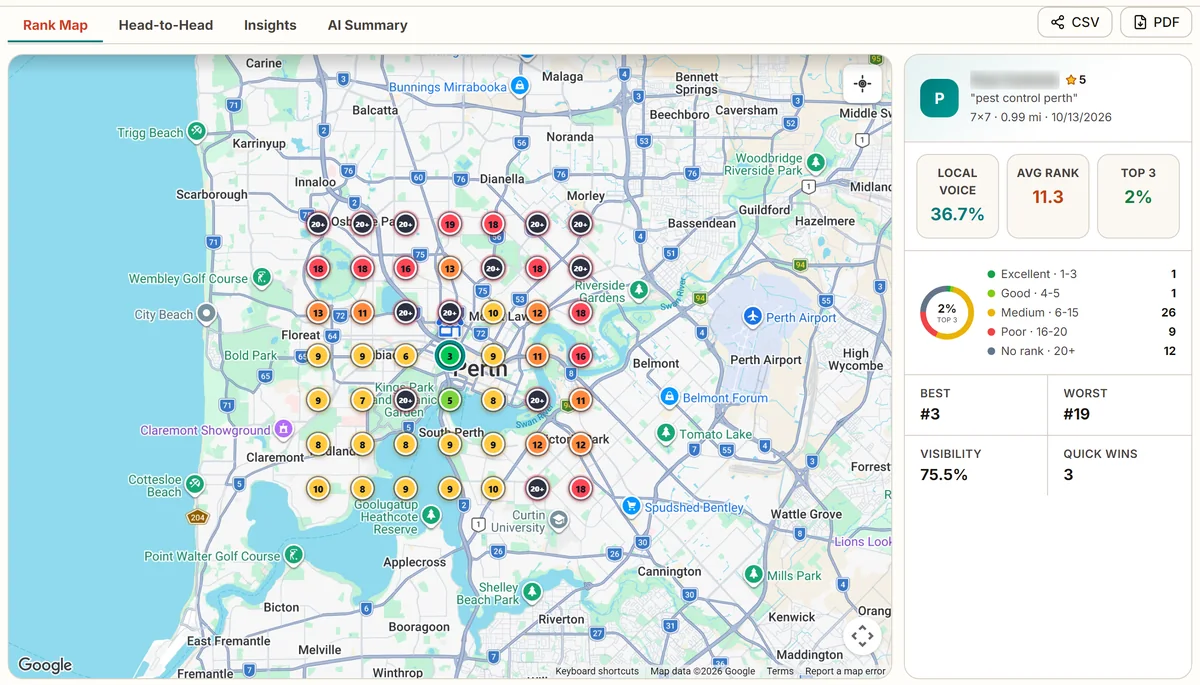
Here is what a new profile looks like on a grid. This pest control company in Perth, Australia had one review when we scanned it in October 2026. It ranked 3rd at its own address, which is close to the city centre, and fell to 6th to 19th across most of the map. At 12 of 49 points it was not in the top 20. The leaders around it had between 118 and 387 reviews.
How to fix it
Complete every part of the profile on day one: category, services, hours, photos and a description. Then focus on reviews from real customers, a few every week. A new profile catches up by being active, not by waiting.
Part 2: when your business shows, but ranks low
If your name search finds you, Google is showing your profile. The problem is ranking. Google says it ranks local results mainly on three things: relevance, distance and prominence. Relevance is how well your profile matches the search. Distance is how far you are from the searcher. Prominence is how well known you are, from your reviews and from what Google finds about you across the web. It also says there is no way to pay for a better local ranking. Every cause below is one of those three.
7. You only show near your own door
This is the most common case by far, and the London practice at the top of this guide is the clearest example we have. For "cosmetic dentist near me" it ranks 1st from its own street. One mile away in any direction it is not in the top 20. This is not a broken profile; it has 169 reviews and a 4.9 rating. The scan recorded at least 40 other dental practices competing for this search across central London, and for "near me" searches distance carries a lot of weight.
The trap is that the owner checks from the practice, sees first place, and thinks there is no problem. Their patients, two stops away on the Tube, see a different list.
How to fix it
Measure from where your customers are, not where you are, with a grid scan. Then build strength that reaches further: more recent reviews, a page on your website for each area you serve, and links and listings from sites about those areas. In a dense city, a business mostly wins the streets around it; the realistic goal is a bigger green circle, not the whole city.
8. Google does not connect you with that service
The same London practice shows something else. We scanned three of its services on the same day. For two of them it ranks at its door. For the third, "invisible braces", it does not appear in the top 20 anywhere on the map, not even at its own address. The practices that do rank there mostly use the categories "Dental clinic" and "Orthodontist".
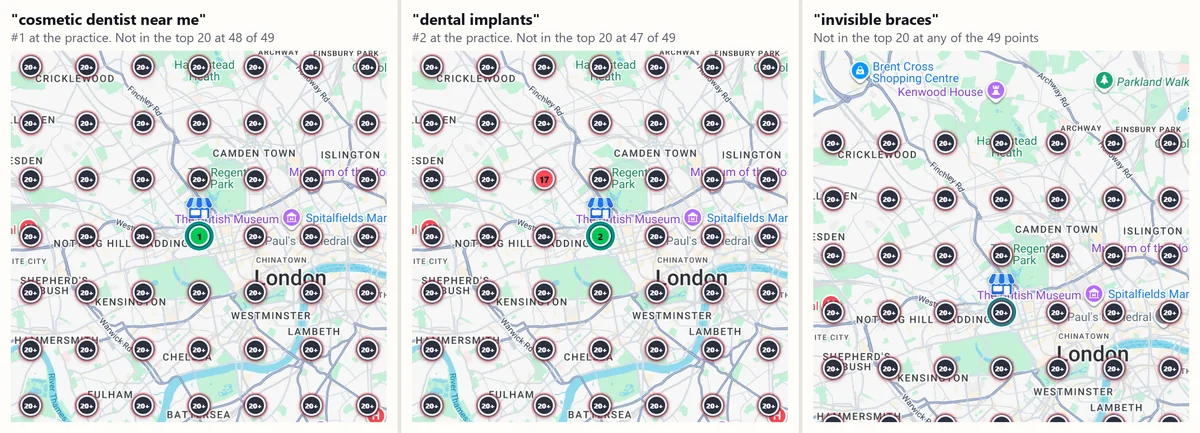
That is a relevance problem. Google does not see enough evidence that this practice offers that treatment, so it barely considers it for that search, however good its reviews are.
How to fix it
For every service you want to be found for: add it as a service on your Business Profile, give it its own page on your website with a clear heading, mention it in your posts and photo captions, and ask customers who had that service to mention it in their review. If a category exists for it, consider it as a secondary category.
9. The primary category is wrong
Your primary category is one of the strongest relevance signals you control. Google's guidelines ask you to choose as few categories as possible and to make the primary one describe your core business, as specifically as you can: "Plumber", not "Contractor"; "Pest control service", not "Service".
The fastest way to check yours is to look at who wins. In a scan of "appliance repair" in a Florida city in November 2026, 31 of the 37 businesses Google showed used the category "Appliance repair service". If your primary category is something broader, you are asking Google to guess.
How to fix it
Search your main service and open the top three results. Their primary category is shown under the name. If yours differs, change it to the most specific one that is true for your business, and add your other real services as secondary categories. Expect the change to go through Google's review first.
10. The businesses around you are stronger
Sometimes a profile is set up correctly and is still outranked, because the businesses nearby are more prominent. The appliance repair business from the previous section is an example. Its profile is claimed and has opening hours and five extra categories, but it had no reviews showing and one photo when we scanned it. It ranked 19th at its own address and was outside the top 20 at 48 of 49 points.
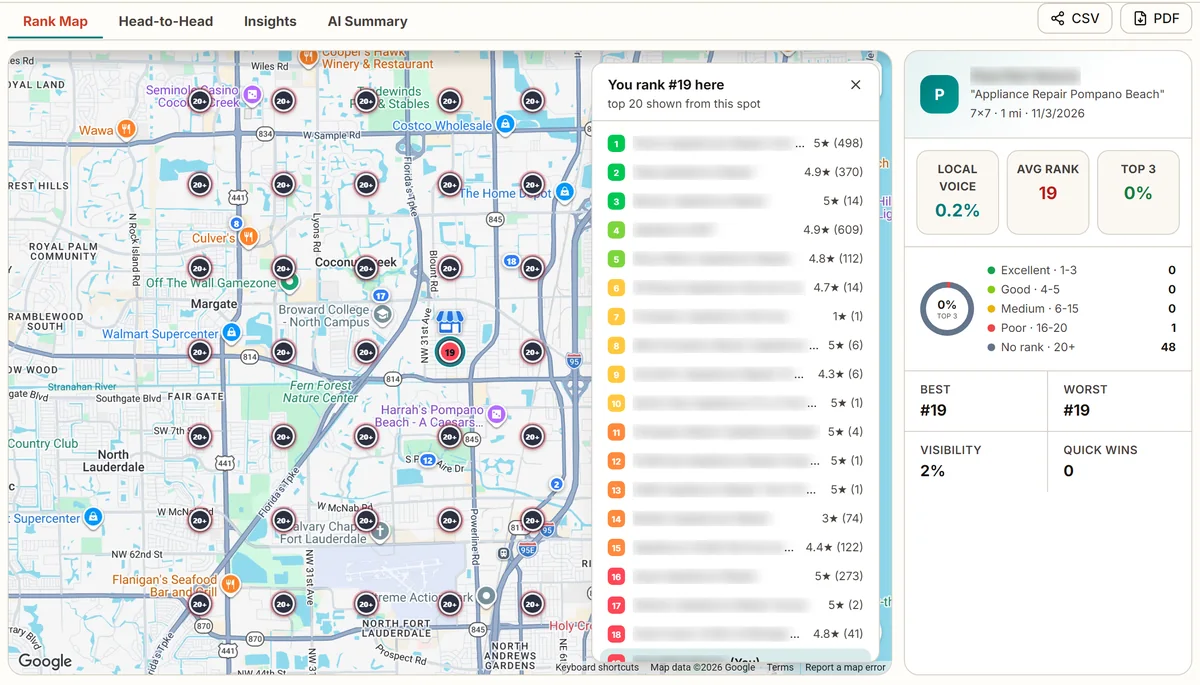
The list is worth reading closely. Not everyone above it has hundreds of reviews; a few have one. But every one of the 18 businesses above it has at least one review, and this profile had none. Prominence is relative: you only need to be stronger than the businesses near the searcher, and the first review is the simplest step up there is.
How to fix it
Ask every happy customer for a review, every week, with a direct link. Add real photos of your work, team and vehicles. Reply to reviews. Then build the signals Google finds across the web: listings on the main directories with the same name, address and phone, and links from local sites. An audit of your profile compares you with the businesses that outrank you, point by point.
11. Your service area is set up wrong
If you go to your customers rather than them coming to you, Google treats you as a service-area business. Its guidelines say a service-area business should hide its address, and its service area page allows up to 20 service areas, which should stay within about 2 hours' drive of where the business is based.
Two mistakes are common. Showing a home address as if it were a shop, which can get the profile suspended. And expecting the service areas to make you rank in every town you list. They describe where you work; they do not move your location. A hidden-address business still ranks best close to the address it verified with, so a grid scan of a service-area business looks just like any other: strong near the base, weaker further out.
How to fix it
Hide the address if customers do not visit you. List the towns or postcodes you really serve, up to 20. Then support the far ones with a page on your website for each area and reviews from customers who live there.
12. Your details disagree across the web
Prominence also comes from what Google finds about you elsewhere: links, articles and directory listings. When your old name, old address or old phone number is still listed on directories, Google gets mixed signals about who and where you are. It rarely hides a profile on its own, but it can make Google less sure about you, and it is often the reason a business that moved or rebranded drops for months.
How to fix it
Search your old phone number and old address. Correct every listing you find, starting with the big directories and your industry's own. Make sure your website shows the same name, address and phone as your profile, in the footer and on the contact page.
How long Google takes: the waiting times in one table
A lot of "not showing" problems are really "not showing yet". These are the times Google itself gives.
| What you are waiting for | What Google says | Source |
|---|---|---|
| A verification review | Up to 5 business days, occasionally longer | Verify your business |
| A video verification review | Up to 5 business days | Video verification |
| A postcard code | Expires after 30 days | Verify your business |
| An edit to your profile | Usually up to 10 minutes, sometimes up to 30 days | Edit your profile |
| A change to appear | Up to 3 days | Troubleshooter |
| A new business to rank | Up to a month | Troubleshooter |
| An ownership request on a duplicate | The current owner has 3 days to respond | Duplicate profiles |
Checked against each Google help page on November 6, 2026.
Not showing on Google Maps: the checklist
Copy this into your notes and work down it.
Is it hidden?
Exact name search on Google Maps in a private window finds nothing
Profile shows "Get verified", a suspension notice or an edit under review
A second listing comes up for your phone number
The address is a P.O. box, a virtual office or a home you do not meet customers at
The profile is less than a month old
Is it ranked low?
A grid scan shows you only near your own address
You are missing for one service but not others
Your primary category differs from the top three businesses
You have fewer reviews and photos than the businesses that outrank you
Your service areas are missing, or your address is shown when it should be hidden
Old names, addresses or phone numbers are still listed on other sites
See where your business shows, and where it does not
Run a scan of your main service across your area. If you are missing at your own address, check causes 1 to 6. If you are missing a few miles out, the audit shows what the businesses beating you have that you do not.
Questions people ask when their business is not on Google Maps
Why is my business not showing up on Google Maps?
There are two very different reasons, and the first step is to find out which one you have. Search your exact business name on Google Maps in a private window. If it does not appear, your profile is hidden: it is not verified, it is suspended, it is a duplicate, it is under review after an edit, or it is too new. If it does appear by name but not when you search your service, such as "plumber", it is showing but ranking low, usually because of distance, the wrong category, a service Google does not connect you with, or fewer reviews than the businesses around you.
Why did my business disappear from Google Maps?
A business that was showing and then vanished has usually been suspended, flagged as a duplicate, or had an edit put under review. Sign in to your Business Profile and look for a message at the top. Google says a suspended profile cannot be seen by the public, and that a restriction on your Google account suspends every profile on it. If there is no message, check whether a recent change to your name, address or category is still being reviewed, which Google says can take up to 30 days.
How do I know if my Google Business Profile is suspended?
Sign in to the Google account that manages the profile and open it. A suspended or restricted profile shows a notice saying so. You appeal through Google's appeals tool with evidence such as a business licence, a utility bill or photos of your signage. Google is clear that you should not create a new profile for the same business while you wait.
How long does it take for a business to show up on Google Maps after verification?
Google says changes can take up to 3 days to appear and that rankings for new businesses can take up to a month to show in search results. Verification reviews take up to 5 business days, and a postcard code expires after 30 days. If your profile is verified and still does not appear by name after a week, look for a duplicate or a suspension notice.
Why does my business only show up when I search the name?
Because a name search is easy to match and a service search is a competition. When someone searches "dentist" or "plumber", Google ranks every nearby business on relevance, distance and prominence. If you show for your name but not your service, the usual fixes are the right primary category, the service added to your profile and to a page on your website, more recent reviews, and links and listings that mention the areas you serve.
Why can I see my business on Google Maps but my customers cannot?
You are almost certainly searching from your own business, and you may be signed in. Results change with the searcher's location, so you see yourself near the top while a customer two miles away gets a different list. In one real scan of a London dental practice, it ranked first from its own street and was outside the top 20 at 48 of 49 points around it. A grid scan shows what customers see across your area.
How do I fix a duplicate listing on Google Maps?
Google allows one profile per business and says duplicates will not show on Search or Maps. If you created the duplicate, remove it. If someone else manages it, request ownership; Google gives the current owner 3 days to respond. If you moved, update your existing profile with the new address rather than creating a new one, so you keep your reviews.
Can I pay Google to show my business higher on Maps?
No. Google says there is no way to request or pay for a better local ranking. You can pay for ads, which appear in a separate, labelled spot, but the normal map results are ranked on relevance, distance and prominence.